FoundryVTT Embedding Content
The past days, I’ve been setting up The Waking of Willowby Hall (WoWH) in FoundryVTT to hopefully run at some later point. Now, WoWH is a dense module, which has been quite motivating to read. There are plenty of random tables, references, and exciting chances that happen while playing the game. In trying to put it all into FoundryVTT, though, I had to learn a few new things about the program. What particularly vexed me was how to easily incorporate the tables to be on-hand during play, and referencing saves and skills. I’ve been setting it up for Old School Essentials, and wanted to figure out automation as much as possible. This post outlines what I’ve learned so far, and what I still need to learn.
Embedding Tables
The adventure comes with these fun little random tables spread throughout, such as the following for the Skeletal Servants:
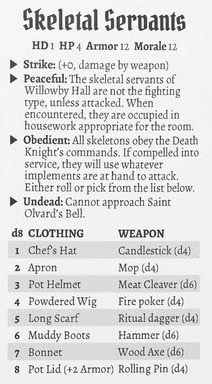 It seemed quite convenient to have the table there to be referenced when I have the Skeletal Servant open, but tables are separate objects.
Fortunately,
It seemed quite convenient to have the table there to be referenced when I have the Skeletal Servant open, but tables are separate objects.
Fortunately, @Embed comes to the rescue!
With a little bit of referencing, I found this article on the FoundryVTT knowledge base, which described how to embed items.
It turns out that all I needed to do was enter @Embed[RollTable.{UUID HERE} rollable] to get the table into the monster’s entry directly, and allow me to roll on it!
The end result is actually quite similar to the module:
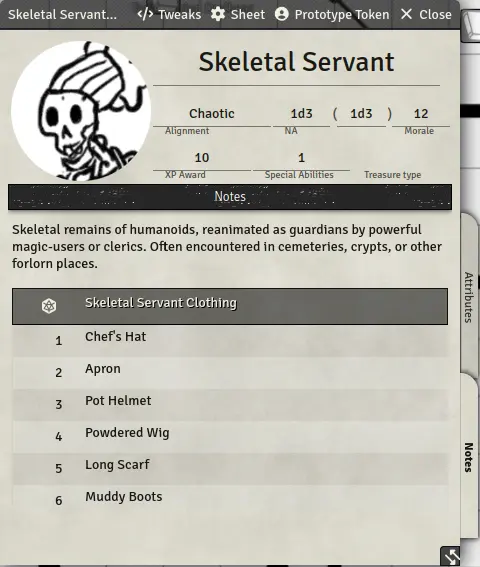 Clicking that little Foundry-D20 icon will roll on the table right away, using all the settings you’ve defined for your table.
Embedding Checks and Saves
The next thing that puzzled me a bit was how to get attribute checks and saves as a clickable button in places. Or, heck, even referencing them to begin with. In running Abomination Vaults for FoundryVTT, I saw that there were buttons to use to directly call for skill checks or saves from players. So, I knew technologically it should be possible. I just needed to figure out how. I ended up finding the secret in the Advanced Dice entry of the Knowledge Base, under “Data Path as Variables”. You can reference variables of characters using @ followed by a specific link to attributes of a character. Finding those attributes, however, was a bit of an adventure.
Firstly, you need to open web developer tools on your browser.
In Firefox, that’s ctrl+shift+I.
Next, you have to select the “Console” tab.
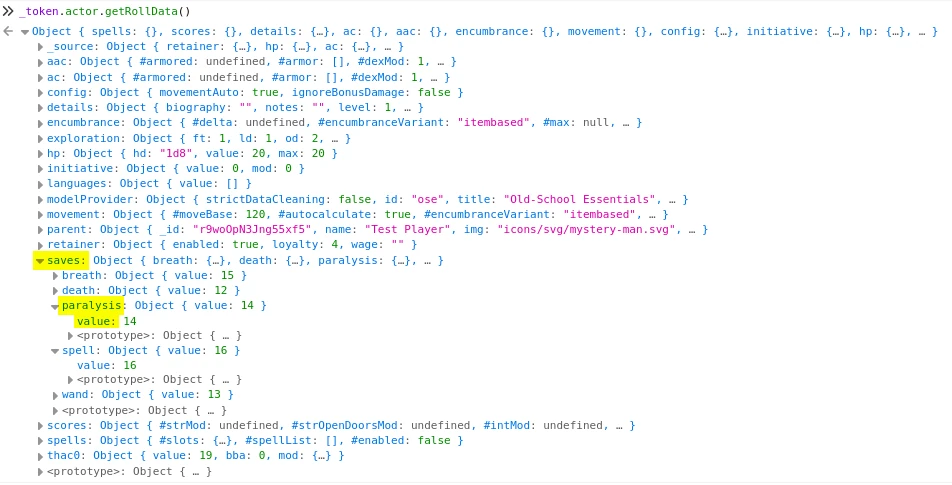
You have to select a token in FoundryVTT and enter _token.actor.getRollData();
That’ll output a one-line “Object”, which you can click on to open and explore all the attributes that object has.
What I was interested in was saves and scores.
Fortunately, those were literally listed there!
For example, under saves was a paralysis heading, which had a value: 14 in it.
That means that this variable can be referenced in OSE for FoundryVTT using @saves.paralysis.value
Caveat
This puts in the save, and references the selected token, to my knowledge. However, a challenge comes up when I try to put that in as an ability for a monster. What it does then is use the value for the monster who has the ability, not the players. I’ve also not been able to figure out yet how to make it so you can drag these to the chat so PCs can click it themselves. However, it seems to work just fine if I want to roll a check or save for a PC based on an event (such as “pass a dexterity save to keep your footing”).
Embedding Dice Rolls
Ideally, what I wanted to end up with was a way to code that roll into an entry, similar to how the module does it.
For example, in one room, disturbing a thing releases a puff of dust, causing PCs to cough and choke loudly unless they pass a save.
For Knave, “saves” just refer to checking a character ability.
In OSE, I wanted to use Save vs Breath for this.
I had to reference Basic Dice for inline rolling, Advanced Dice to learn to use attributes in the roll, and finally Dice Modifiers to learn how to count successes.
Putting all of those together, I saw that making a Save vs Spell button in a journal entry meant making an inline roll entry like this: [[/roll 1d20cs<=@saves.breath.value # Save vs Breath or cough and choke loudly, causing a random encounter roll. 0=Failure, 1=success.]]{Save Vs Breath}.
Quite a package!
So, let’s look at it step-by-step:
[[/roll 1d20]] is how you make a public roll.
Basic Dice describes roll modes to hide information from players, but this is fine for now.
Adding the cs is from Dice Modifiers, and stands for “Count Successes”.
We want this to be lower or equal to the Save Vs Breath, so we have to refer to @saves.breath.value (as explained in the Advanced Dice).
Putting all that together makes cs<=@saves.breath.value.
Everything after the # is the description that’ll pop up in chat for the roll.
I use that space as well to explain that this counts the number of success, so a 0 means failure, and a 1 means success.
Lastly, {Save vs Breath} is what will actually be the button in the journal.
Limitations
So, the previous already showed two limitations that I currently don’t know how to get around. Firstly, the button can’t be dragged from a journal to chat for everybody to click. I’d love to get that solved too, because it’ll make it much more transparent. Secondly, it currently counts the number of successes, so it just outputs ‘0’ or ‘1’ as a result. I’d love for it to output “Success” or “Fail”. However, I can’t seem to be able to specify or alter the outcomes. If I ever figure that out, or updates change this, I’ll make a new post to work that out. For now, I hope this’ll help others trying to do the same thing.
Your comments are welcome!